Booking Lookup at the Sedgwick County Adult Detention Facility gives instant access to booking details, including the booking number, date, time, location, and current status, so families and attorneys can quickly verify intake information. The online portal lets you perform a booking record search by name or number, revealing charges, bond amounts, and release dates while showing updates from the booking database as soon as they are entered.
When you need to find recent booking records or check a booking status, the system displays the booking history, disposition, and associated case details, helping you confirm identification information and understand any pending processing. If a record appears missing or restricted, the site offers guidance on troubleshooting, correcting inaccurate data, and contacting the detention center for further assistance.
How to Search Booking Lookup
Booking Lookup is the public search function for adults booked into the Sedgwick County Adult Detention Facility. It lets readers confirm whether a booking appears and review details such as the booking number, booking date, booking time, location, charges, bond amount, disposition, and current status. Individuals can also check booking reports online records to verify relevant details. Searches can use a person’s name or booking number. The result is a detention record used for a quick status check, not a full court case file.
Official Search Portal: https://ssc.sedgwickcounty.org/InmateSearch/
Steps to Search
- Open the official Sedgwick County inmate search page.
- Enter the person’s name in the name fields shown, or type a booking number in the booking-number field.
- Submit the search and review every matching result.
- Compare the booking number, booking date, booking time, and location with details supplied by your source.
- Open the matching listing to review charges, bond, disposition, release status, and the most recent update date.
Booking Details Shown in a Sedgwick County Record
A booking record begins with detention intake and ties together the booking number, timing, facility, charges, custody status, and later record changes. The public result can contain several fields, and the set shown depends on the record’s stage and public-display status. Read the booking number as the strongest identifier when a person has more than one name or booking history.
A booking record contains details about a person’s intake and custody status. The booking number, date, and time identify a specific intake event, while the booking location indicates the detention facility. The current booking status shows the custody condition, and the processing status indicates whether the record is pending or processed.
Intake and identification details describe information recorded during booking, while charges at booking list the alleged offenses. The bond or bail amount shows the amount recorded at the relevant time. The booking disposition, release status, and release date provide information about the custody outcome. Associated case details link the booking to related court proceedings, and the record update date indicates when the entry was last changed. Verify important details with the relevant detention facility or court, as information may change.
Reading Listed Charges and Booking Dispositions
At booking, an accused person may be booked on one or more alleged offenses. A listed charge identifies what was recorded at intake; it does not decide guilt, sentencing, or the legal outcome of the case. The booking disposition is the custody event or status tied to that intake, so it can differ from the disposition shown in a court case.
Use the booking lookup for intake facts and the court record for legal rulings. A changed charge or status may reach each system at a different time, which makes the record update date useful when comparing entries. A booking number also gives you a clean way to request a correction from the facility without relying on a common name alone.
Reading Bond, Bail, and Release Status
The bond or bail amount shown is the monetary figure connected to the booking at the time of the listing. It is a status snapshot and may not describe every condition, later order, or payment recorded elsewhere. If an amount appears beside a pending or processed label, read both entries together; the processing label refers to record handling rather than bond status.
Release status states whether release has been recorded in the visible entry. A release date gives the date displayed. A historical booking may remain searchable after release, so finding a booking number does not by itself prove that the person remains in custody. For a current custody check, review the current status, release entry, record update date, and facility response when the result is unclear.
Reading Associated Case Details and Processing Status
An associated case entry links the detention booking to a court matter. It can provide a case reference and help distinguish repeat bookings involving the same person. The entry does not reproduce the full court docket, filings, or legal decisions.
A pending status means the record has not completed all booking or database steps. A processed status means it has moved beyond the displayed processing stage. Neither label alone says that a person has been released or that a case has ended. The update date, booking date, and time shown beside the status give the clearest view of record timing.
Verifying a Booking Record and Troubleshooting Search Results
A failed search does not always mean that no booking exists. Names can be spelled differently, a recent booking may not have reached the public database, or some details may not be available for public view. The right check depends on whether you have a booking number, a name, or written notice from the booking source.
Matching Identifiers for Similar Names
People can have more than one booking under the same name. Each booking number should be read as a separate intake event with its own date, status, and record history. Use the checks below to match the correct event rather than assuming that every result with the same name belongs to one booking.
- Use the booking number as the deciding identifier whenever it is known.
- Compare the complete name, including middle names or initials, with the source that supplied it.
- Compare the booking date, booking time, and location with the source document.
- Treat each booking number as a separate intake event, even when the names match.
- Check the latest update date before treating two listings as duplicate entries.
- Ask facility staff to match records when two entries remain difficult to separate.
A booking number lookup gives the cleanest result when a receipt, case paper, or written notice contains that number. If only a name is available, compare the full name and expected booking date before reviewing charges or release details. Users can also reference 72 hour booking legal records for additional information. A common name can produce several valid results, so the first matching entry should not be treated as the only match.
Delays During Recent Intake Processing
A booking can move through intake, identification checks, charge entry, bond processing, record completion, and database entry. These steps can occur at different speeds. A person may be physically booked at the facility before the public row appears, so a missing search result does not prove that the intake never happened.
The public portal reflects changes after staff enter them. A recent booking may be absent, partial, or marked pending until record processing catches up with the intake event. Check the record update date and try the search again later. Using a booking number from a receipt or notice can reduce false matches and make a repeat search faster.
No fixed posting interval should be assumed for every booking. Intake volume, record completion, and the timing of staff entries can change the delay. For a booking that should already be complete, use the facility contact details at the end of this page to request a current status check.
Missing, Restricted, or Unlisted Booking Files
A no-result page can reflect a spelling mismatch, an incomplete database entry, a record outside public display, or an older file outside the current results. A common name can add to the confusion by producing several bookings that belong to different people. Start with the exact spelling and every known identifier before treating the file as missing.
Some booking records may be restricted in full or show only selected fields. Public display can change as a case or custody status changes, and an incomplete booking can contain blank fields while staff finish recording intake events. The absence of a field should not be read as proof that a charge, bond, or release event does not exist.
Archived or older bookings may not appear in the current public result set. The search page should not be treated as a promise of permanent public retention or a complete historical archive. The facility can confirm whether a specific older booking is retained and whether its details can be viewed publicly.
Correcting Inaccurate Record Details
Write down the booking number, the field with the error, the exact text shown, the proposed correction, and the source that supports the change. Those details help staff locate the right record and distinguish a data-entry mistake from a misunderstanding of the charge, bond, disposition, or release entry.
Ask the facility to compare the public listing with its internal booking record. If the disputed item concerns a court charge, sentence, or case status, the court record may be the controlling source. The facility can address the detention entries it holds; a court entry may need correction through the court or agency that maintains that record.
Keep the source paper and note the date of the request. Ask for confirmation after a correction and check the record update date on a later search. This creates a clear trail and helps resolve any difference between an older saved result and the current public listing.
Booking Record Availability, Updates, and Related Public Records
Booking records can be newly added, updated, restricted, incomplete, or archived. The search result reflects the public database at the time it is viewed, not every step taking place inside the facility. The table below explains common search situations and the best next check for each one.
Record Situations
Status labels and search results can change as staff complete booking work and enter later updates. Use the record update date to judge whether a result is current for the purpose of your search.
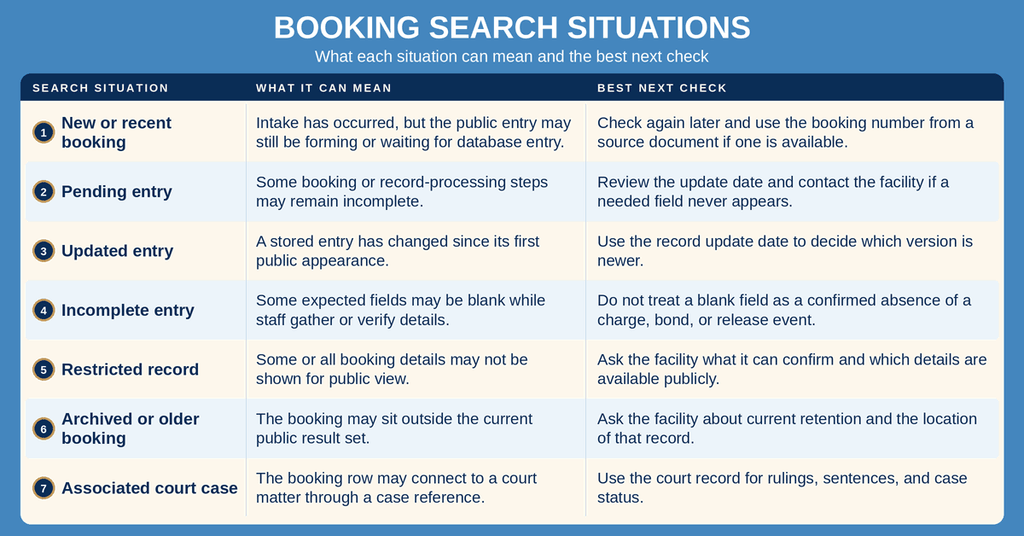
New intake and public posting are separate events. The portal shows updates after staff enter them, but it does not show the physical intake process as it happens. You can also consult current inmates public records to locate official filings. No uniform public posting interval can be assumed across every record, so the update date and booking date should be checked together.
Why Booking and Court Records May Differ
A booking record is a custody record created during detention intake. It follows events at the facility, such as admission, charge entry, bond, and release. A court case record follows the legal case, including filings and rulings. An arrest record documents the arrest event and related agency actions. These records connect to one another, yet each has its own purpose and identifier.
A case reference in a booking result links the two records without merging them. A booking entry may continue to show an alleged charge after the court has taken a later action, or a release field may wait until staff enter that event. These differences can come from record scope and update timing rather than an error in either source.
For legal decisions, compare the official court case record. For custody intake, status, and booking details, use the official booking lookup and the facility. A public booking result alone does not establish a conviction, sentence, case closure, or present physical custody.
Judging Record Freshness
The record update date marks the latest stored change. It does not mark the moment a person arrived at the facility, which is why the booking date and time should also be reviewed. Comparing those fields can show whether a result has been changed since the booking was first entered.
Save the booking number and the date of each search. If a result later changes, those saved details make the earlier version easier to explain. For a current status request, state the booking number, name, and expected date when contacting the facility.
Contact Information
Contact the facility for a missing booking row, a disputed field, a request to confirm a record, or a question about an older file.
Address: Sedgwick County Adult Detention Facility 141 W. Elm Wichita, KS 67203
Phone: (316) 660-5245
Office hours: Open 24 hours a day, 7 days a week (24/7)
Frequently Asked Questions
Find quick answers about using the Sedgwick County Booking Lookup tool, what information you can see, and how to handle common issues.
How can I use Booking Lookup by name?
Visit the official Sedgwick County Inmate Search portal and select the name search option. Enter the full or partial name of the person you are looking for, then click the search button. The system returns any matches from the detention facility’s booking database. Review each result for the correct individual by checking details such as booking date, location, and charges. If multiple matches appear, use additional identifiers like birth date or middle name to narrow the list.
What details appear in a booking record?
A booking record shows the booking number, date, and time of intake. It lists the detention center address, charges filed, and bond amount if set. The record also includes the inmate’s identification number, current booking status, and any disposition notes such as release date or transfer information. Additional fields may note the case number and the law enforcement agency that made the arrest. All data is drawn from the county’s public booking database.
How do I find recent booking records online?
Open the Sedgwick County Adult Detention Facility’s online search page. Choose the “most recent” filter or sort results by booking date descending. Enter any known information, such as a name or booking number, to narrow the list. The portal updates several times a day, so the newest entries appear quickly after intake. Review the displayed records for the required details. If no results show, verify spelling or try a broader search criteria.
Why might a booking record be missing?
A record may be absent if the intake has not yet been entered into the public system. Some records are restricted for ongoing investigations or court orders, which prevents them from appearing online. Errors during data entry can also cause a temporary gap. In rare cases, the record may have been archived after the inmate’s release and is no longer part of the active database. Contact the detention facility’s information line for clarification when a expected record does not show.
Can I correct inaccurate booking information?
If you notice an error, call the Sedgwick County Adult Detention Facility at the listed number during any hour. Provide the booking number and describe the mistake clearly. Staff will verify the claim and, if valid, update the public record. Some changes may require a written request or supporting documentation, especially for legal details. After correction, the updated information should appear in the online lookup within one business day.